Because the microphone is located relatively close to the engine area, it may sometimes pick up additional background or engine noise, which can reduce voice clarity during calls.
You can improve the microphone performance through the following settings:
For 7870 Version
- Open Settings
- Go to Sound
- Scroll to the bottom of the page
- Adjust the Microphone Gain parameter to improve voice clarity
For 7862 Version
- Open the main APP interface
- Open Bluetooth
- Press and hold the icon on the right side of the screen
- A hidden parameter adjustment window will appear
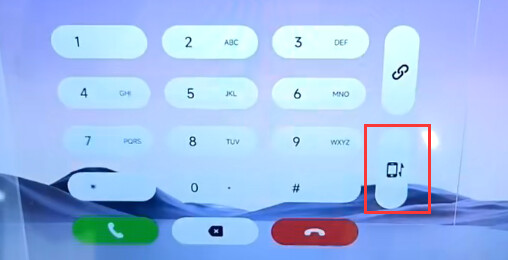
From there, you can modify the microphone-related settings for better audio performance.
Small adjustments can make a noticeable difference in reducing background noise and improving call quality.